A schedule for the whole week, with hours and cost next to each person
You lay out shifts before opening, approve time off on the same screen and set panel access separately for each person.
On the Whole venue plan.
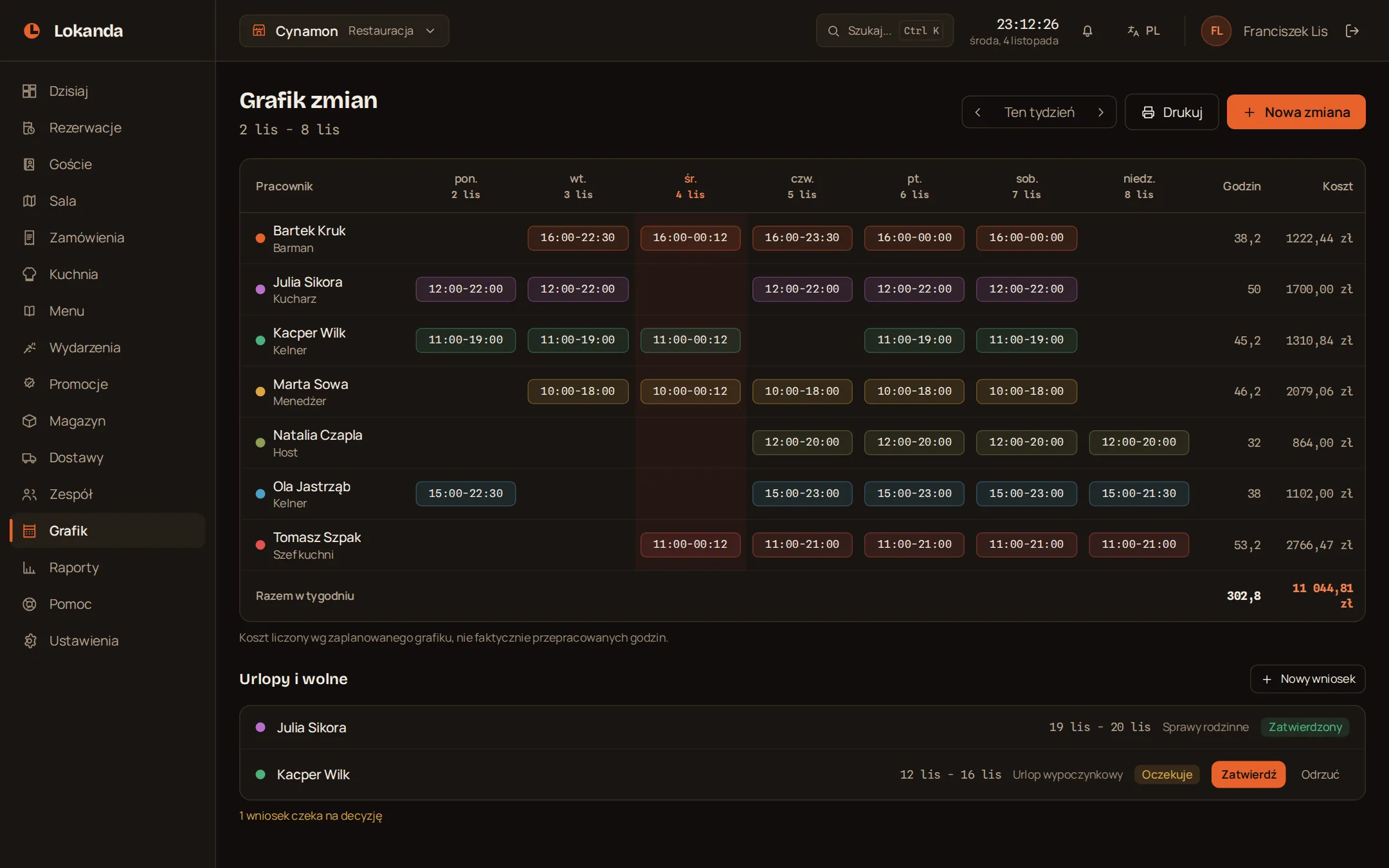
A shift past midnight is still one shift
When the end falls before the start, the panel adds the next day. Hours and cost count in full, from the start to the end of the shift.
The week on one table
| Employee | Mon | Tue | Wed | Thu | Fri | Sat | Sun | Hours | Cost |
|---|---|---|---|---|---|---|---|---|---|
| Anna | 10-18 | 10-18 | off | 10-18 | 10-18 | off | 12-20 | 40 | PLN 1,280 |
| Kasia | off | 16-00 | 16-00 | 16-00 | 16-00 | 16-00 | off | 40 | PLN 1,200 |
| Tomek | 18-02 | off | 18-02 | off | 18-02 | 18-02 | off | 32 | PLN 1,088 |
8 hours x PLN 32 = PLN 256
A shift costs its hours times the rate
We calculate the cost from the planned schedule, not from hours actually worked.
- Weekly total
- at the bottom of the schedule
- Rates
- visible to people with staff access
- Schedule
- printable
A time-off request waits for a decision next to the schedule
- Pending
- Approved
- Rejected
- Range
- dates from and to, the reason is optional
- Decision
- a person with staff access
- Today screen
- shows the number of pending requests
Three roles, and staff get only what they need
The owner and manager have every area. You switch them on one by one for each staff member.
| Area | Owner | Manager | Staff |
|---|---|---|---|
| Menu management | yes | yes | when you switch it on |
| Staff and schedule | yes | yes | when you switch it on |
| Reservation management | yes | yes | when you switch it on |
| Inventory and purchasing | yes | yes | when you switch it on |
| Promotions | yes | yes | when you switch it on |
| Billing view | yes | yes | when you switch it on |
| Reports and results | yes | yes | when you switch it on |
| Panel access and roles | yes | no | no |
| Invoice details | yes | no | no |
A person on the schedule needs no panel account
You keep the employee list for the schedule. Who logs in to the panel and what they manage is set separately in Settings.
- Position on the schedule
- waiter, bartender, cook, security and more
- Colour on the schedule
- you set it for each person
- Team accounts
- no limit
- The last owner
- cannot be removed
The venue history shows who changed what
Team changes, stock adjustments and voids stay in one place, in Settings.
Anna
added a person to the team: Janek (staff)
Anna
changed access for: Tomek